
Attachment Tools
AttachTracker 1.1
|
|
|
>
PROBLEM
|
> SOLUTION
|
|
When users delete Outlook® messages, they also delete all the mailing information of
the files that have been attached to the message. There is no way to track if, when, or by whom a file was sent or received.
|
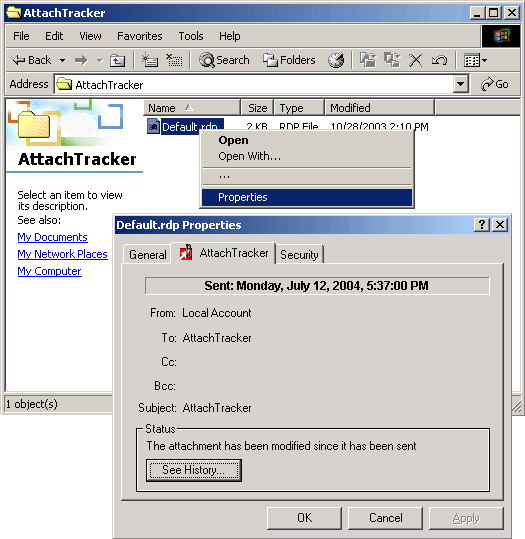
AttachTracker writes the mailing information and displays information directly in Windows Explorer, without opening Outlook®.
Mailing information associated to a file sent or received are now available with a simple right click on the file name in Windows Explorer.
Users can now delete the messages and their attachments and still look-up the mailing history information directly from the file.
|
|
Description
AttachTracker includes the following functions :
- Access to the mailing information from the file properties through Windows Explorer with a simple right click
- Management of the following mail information:
- For sent files :
- date/time of sending, recipients list (To, Cc) , history of file modification and renaming
For received files :
- date/time of reception, sender address, recipients list (To, Cc)
- history of file modification and renaming
For more information, please contact the sales department at sales@addonmail.com
|
|
|
|
|
|