

Solutions for Outlook® PST Files
BackupMyFolder! 1.3.2
|
|
|
>
PROBLEM
|
> SOLUTION
|
|
You need an easy solution to backup important folders or mails and to control how
your backup is run ? |
BackupMyFolder! for Outlook® 200x :
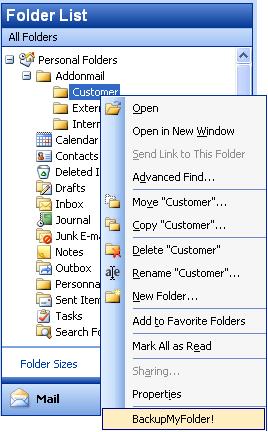
With BackupMyFolder! for Outlook®, you will be able to configure in one click
the folders you want to backup, set up when to run the job and get a full
history of previous backup jobs.
|
|
BackupMyFolder! for Outlook® 200x is FREE
FREE Backup tool for Outlook® PST files and folders
BackupMyFolder! is a very useful and FREE plugin for Outlook® 200x that lets you easily backup PST files and important folders.
Backups can be set up as a 'full backup' (meaning that all PST files included in your Outlook® profile are backed up), or as a 'folder level backup'.
The 'folder level backup' option lets you mark the important folders in each PST file you want to archive, as well as choose to exclude attachments from the backup, or reducing the size of your archive files.
The archived PST files can be stored locally on the same computer or on a remote file server. By default, backup is incremental, meaning that only new and changed items are stored in the archive file.
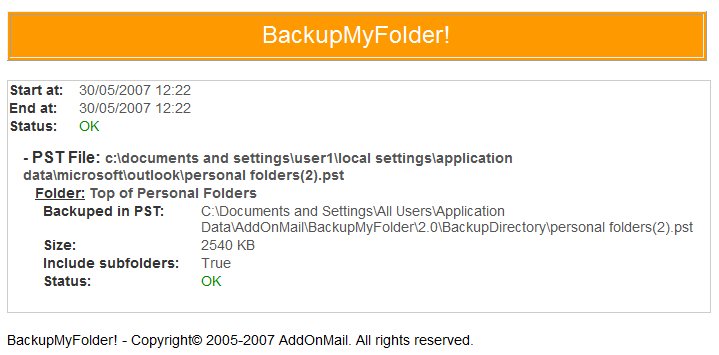
Backup jobs are run whether Outlook® is open or closed and a report of the last backup is displayed when Outlook® restarts.
With BackupMyFolder! treeview, users can see at a glance which folder is marked to be saved, as well as the result of the latest backup.
|

|
|
|
> Key points
Top
|
- Easy to configure
- Folder level option to select important folders
- Treeview to see marked folders at a glance
- Full history log of ten past backup runs
- Local or remote archived PST files
- FREE. No license costs
For more information, please contact the sales department
at
sales@addonmail.com
|
|
|
|